Acer Iconia Smart has 21:9 screen, Liquid swaps the Metal for mt

The Acer Iconia Smart is part tablet, part phone, all droid. The tablet/phone has an extra-wide screen with aspirations of portable multimedia perfection. Also, the Acer Liquid Metal changed its name but not its specs.
The Acer Iconia Smart features a 21:9 widescreen display, 4.8" big with 1024x480 pixels resolution - now that's downright impressive. Dolby surround sound technology enhances viewing movies even further.
 
Acer Iconia Smart (image source)
The Iconia Smart runs Android 2.3.2 Gingerbread covered with the latest Acer UI version 4.0, also called "Breeze". The whole thing is powered by a 1GHz Snapdragon chipset, which has enough power to drive Flash 10.1 in the web browser.


There are two cameras - an 8MP main camera with LED flash and 720p video recording and a secondary 1.3MP camera for video calling.
The Acer Iconia Smart has a unibody metal casing and it will be available in Silver. A gyroscope and an accelerometer will enable high-precision motion-controlled gaming.
The Acer Liquid Metal showed up at Acer's booths under a new name - the Acer Liquid mt. Nothing else has changed, just the name.
Stay tuned for our Acer hands-on straight from MWC 2011.

Read More...

Samsung Galaxy Ace S5830 and Galaxy Suit S5670 pop up

Official photos of a couple of Samsung Android smartphones just appeared. The Galaxy Ace S5830 makes its second public appearance, while the Galaxy Suit S5670 is only now taking its first trip through Rumorland.


Samsung Galaxy Ace S5830 was initially known as Galaxy Mini, when it leaked a couple of days ago. Apart from the new name, the newly leaked low-resolution shot doesn't reveal any new information about the handset’s specs sheet. So far we have Android 2.2 Froyo, 5 megapixel camera with LED flash and an HVGA screen. Wi-Fi and Bluetooth 3.0 are also confirmed, while GPS and microUSB seem like a pretty reasonable guess.
Samsung
Samsung Galaxy Ace S5830
The Samsung Suit S5670 on the other hand, remains a complete enigma to us. Its model number and looks suggest mid-range functionality, so it might be the I5500 Galaxy 5 successor. Judging by the icons on the screen, the Samsung Suite S5670 is running Android 2.2 Froyo too.
Samsung
Samsung Galaxy Suit S5670
It appears that Samsung will be quite busy at the MWC this year. We’ve already seen four Android smartphones, including the Galaxy S 2. Undoubtedly the Koreans will also have some Bada devices to show us and we might even see a new WP7 handset or two.
Source
Read More...

HP Pavilion dm1z Review

Pavilion dm1z customizable Notebook PC with ; FREE Upgrade to 3GB DDR3 System Memory - 1 Dimm ; FREE Upgrade to 320GB 7200RPM Hard Drive with HP ProtectSmart Hard Drive Protection ; Genuine Windows 7 Home Premium 64-bit ;


$524.99   HP Direct


Review Summary:
The HP Pavilion dm1z delivers good value with solid performance and decent battery life for a low price.
Pros
  • Best video and gaming performance in the price range
  • Nice keyboard
  • Good battery life and low price
Cons
  • Occasional touchpad glitches
  • No USB 3.0 port
  • Doesn't deliver "9.5 hours" of battery life in real world use

HP Pavilion dm1z Full Review

 The new HP Pavilion dm1 (also called the Pavilion dm1z) is an 11-inch notebook that uses the latest AMD Fusion technology to combine a fast dual-core processor and powerful graphics inside a budget-priced netbook alternative. Is this the best new notebook for 2011? Keep reading to find out.
BUY the Pavilion dm1z customizable Notebook PC with ; FREE Upgrade to 3GB DDR3 System Memory - 1 Dimm ; FREE Upgrade to 320GB 7200RPM Hard Drive with HP ProtectSmart Hard Drive Protection ; Genuine Windows 7 Home Premium 64-bit ;
Our HP Pavilion dm1 (dm1z) features the following specifications:
  • AMD E-350 with AMD Radeon HD 6310 Graphics (dual-core CPU at 1.6 GHz and dual DX-11 SIMDs at 500 MHz)
  • 11.6-inch 1366 x 768 HD glossy display with LED backlighting
  • Windows 7 Home Premium (64-bit)
  • 3 GB DDR3 memory
  • 320 GB, 7200 rpm HDD (Hitachi Travelstar 7K500)
  • Gigabit Ethernet and 802.11b/g/n wireless
  • Bluetooth 3.0 (Ralink Motorola BC8)
  • 6-cell Li-ion battery (51Wh)
  • Dimensions: 11.45 (L) x 8.45 (W) x 0.9 - 1.25 (H) inches
  • Weight: 3.53 pounds
  • MSRP: $449.99
Build and Design

The new HP Pavilion dm1 is an evolutionary update to last year's Pavilion dm1z and the dv2 from 2009. Stylistically, the dm1 has more in common with the dm3. In fact, if you place the new dm1 side by side with last year's dm3, you'll see that this 11-inch notebook is basically a smaller version of the dm3. At first glance it's easy to mistake the dm1z for one of the dozens of HP netbooks that have shown up over the last few years. Fortunately, the Pavilion dm1 has a lot more to offer than those low-performance netbooks.

Build quality is on par with what we've seen from the rest of the HP Pavilion Ultraportable notebooks and HP mini netbooks. The plastics used in the chassis are durable and thick enough to prevent flex or cracking under pressure. The plastic screen lid provides adequate protection for the screen but the middle of the lid does bend inward under firm pressure (be careful jamming this into overhead compartments on your next flight). The lid also features an attractive matte black paint job with black pinstriping done in glossy paint. This makes fingerprint smudges far less visible than what we see on laptop lids with glossy paint jobs.  Opening up the screen, the hinges have enough tension to hold the screen in place when it's motionless but not enough tension to hold the screen in place when you're carrying it around. The rest of the body of the notebook seems to be well designed with minimal chassis flex and no obvious creaks from the plastics.

One area of the design that will probably get a mixed reception is the bottom of the notebook. HP decided to give the new dm1 a clean look with a single massive bottom plate secured by screws that are hidden beneath the foot pads. At first glance there is no expansion bay access panel here and no way to quickly upgrade the RAM or replace the hard drive. Granted, the overwhelming majority of people who buy a $450 laptop will never open it up to make upgrades. However, if you remove the battery, slide the battery release switch again and pull forward on the bottom plate, the entire bottom of the notebook will slide forward giving you access to the RAM, hard drive and wireless cards. I just wish this was a little more obvious for owners who want to upgrade the notebook themselves.
Ports and Features

Port selection on the HP Pavilion dm1z is fairly standard for a modern netbook or 11-inch ultraportable notebook. HP gives you three USB 2.0 ports, HDMI-out, VGA, Gigabit LAN (hidden behind a rubber door), and a single audio jack for headsets, microphones or headphones. It also features a SDHC-card slot for loading images off your camera while traveling or expanding your available storage. The only port that's missing here is a USB 3.0 port. Since we're starting to see USB 3.0 on more consumer notebooks and there are many USB 3.0 external hard drives on the market, we really wish HP had found a way to put at least one USB 3.0 port on this notebook. Also, since USB 3.0 has more voltage than USB 2.0, it would mean that USB accessories and phones could be charged in half the time it takes than to charge over a USB 2.0 port. Here is a quick tour around the new Pavilion dm1:

Front View: Altec Lansing branded speakers


Rear View: Battery and screen hinges


Left Side View: AC power, security lock slot, heat vent, activity lights, HDMI and USB 2.0 port


Right Side View: Media card reader, audio jack, two USB 2.0 ports, VGA and LAN.

Read More...

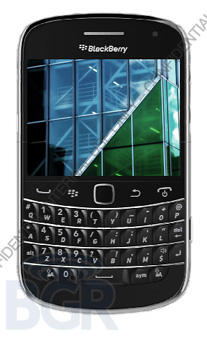
BlackBerry Dakota photo and specifications leak again

Great news for all BlackBerry lovers! A new photo of the BlackBerry Dakota leaked today and it looks just like its prototype the Magnum, which we covered almost a year ago. The only thing different is the trackpad that has been added to the device and the bump in some of the specifications.
This BlackBerry, codenamed Dakota, will pack a 2.8-inch capacitive touchscreen with a VGA resolution of 640x480 pixels and a full physical QWERTY keyboard. It also rocks a 5 MP camera with flash capable of recording HD video. Also available are 4GB of internal storage and 768MB of RAM. What processor will power it is still unknown, though.
A great addition is the 3G mobile hotspot that has been added, allowing the Dakota to spread some Internet love to other devices around. Not to mention the NFC connectivity. The Wi-Fi N, Bluetooth and MicroUSB port come as no surprise.
In addition, the Dakota is going to ship with the new BlackBerry 6.1, announced yesterday at the BlackBerry DevCon Asia. The new version of the BlackBerry platform now supports Magnetometer and Digital compass APIs, OpenGL-ES 2.0, event-base geo-fencing location APIs and much more.
Pricing and availability for the BlackBerry Dakota are still shady. Who knows, maybe RIM will shed some light to the Dakota at the World Mobile Congress.
Source
Read More...

Google Cr-48 Chrome Notebook Review

The Google Cr-48 is a prototype notebook currently being tested in Google's pilot program for the Chrome operating system. Google hopes consumers and businesses will abandon traditional notebooks in favor of what is essentially "a web browser in a box." Keep reading to find out what we think.

Google Cr-48 Technical Specs:


  • Google Chrome OS
  • 12.1-inch matte screen (1280 x 800) with LED backlighting
  • Intel Atom N455 processor (1.66 GHz)
  • Intel integrated graphics
  • 2 GB DDR3 RAM
  • 16 GB SSD (SanDisk SDSA4DH-016G NAND flash)
  • Wi-Fi: 802.11 a/b/g/n
  • Mobile Broadband (3G): CDMA-based WWAN (Qualcomm Gobi2000)
  • Bluetooth 2.1 +EDR (Atheros AR5BBU12)
  • One USB 2.0 port and SD/SDHC memory card reader
  • Li-ion battery (63 Wh capacity)
  • Dimensions: 11.8 x 8.6 x 0.9 inches 
  • Weight: 3.8 pounds
  • Price: FREE ... if you can get on Google's pilot program list


Build and Design

The team at Google made some interesting design choices when they developed the Cr-48. For starters, the design is a simple and traditional clamshell shape with lots of 90-degree angles and straight lines. Combine the boxy exterior with the matte black rubberized paint and you might mistake this prototype notebook for an old ThinkPad. Open the rectangular lid and you'll see a more modern looking Chiclet or island-style keyboard and a MacBook-esque touchpad both covered in an industrial-looking matte finish.

Both the screen lid and the bottom of the notebook share matching rubberized black paint that resists fingerprints and is extremely easy to keep clean. A quick view of the bottom of the Cr-48 reveals no access plates; you just get a massive battery and a small air intake for the cooling fan. The chassis feels extremely durable and doesn't bend or squeak when you try to twist the notebook between your hands. It's clear that the design team responsible for the Cr-48 wanted this laptop to look like it means business. That could be good or bad depending on who you ask.

Although I personally love the retro style of the Cr-48, it's a bit of a tough sell when you consider what the Cr-48 really is. This "notebook" is really just an Atom-powered netbook with a new operating system (which is basically only a web browser) and a giant battery. I'm not sure how many people are going to line up to buy a laptop that is LESS functional than current Atom-powered netbooks if the laptop in question is bulkier and weighs an extra pound or more.
Ports and Features
The simplistic exterior of the Cr-48 extends to the port selection on the sides of the laptop. Google gives you a VGA port for connecting an external monitor, a single USB 2.0 port, a built-in SD/SDHC memory card reader, and a single audio jack. Before you get too excited, it's important to know that only a few of these ports work (more on that issue in the performance section of this review).


Screen and Speakers
The Google Cr-48 uses a nice 12.1-inch anti-glare display with a 16:10 aspect ratio. The 1280 x 800 resolution gives you a few extra lines of vertical resolution and a less horizontal resolution compared to most modern notebooks with 1366 x 768 screens. Regardless of whether you support modern widescreen notebooks with 16:9 ratio screens or love the old 16:10 displays, there is one simple thing that makes the screen on the Cr-48 fantastic: It's NOT a glossy screen!

The matte, anti-glare surface of the 12-inch display allows you to see what's on the screen even if you're viewing in under direct sunlight or you're in an office or home environment with bright lights directly behind you. Try that with a typical glossy screen notebook and all you'll see are reflections.

The viewing angles are quite good on the Cr-48 we used with minimal backlight bleed around the edge of the screen. Default colors on our review sample looked a little biased toward blue (although the photo of the notebook taken under our studio lighting makes this minor color shift look more intense than it is in real life). Overall, this is a very nice screen.


Keyboard and Touchpad

As mentioned previously, the Cr-48 features a modern-looking Chiclet style or island style keyboard with flat individual keys and a little extra space between each key to help prevent typos. Each key provides the perfect feedback with excellent depth to each press and smooth action to each key mechanism. The entire keyboard surface has a firm support structure so there's no flex or bounce while typing even under extreme pressure.
The only problem I personally have with the keyboard is that Google decided to map a few of the traditional keys so that they serve different functions. For example, all of the function keys control specific features like forward, back, and refresh or they control notebook features like screen brightness and volume. The bigger problem for me is that the default setting for the Caps Lock key has been turned into a "Search" key. Not only do I enjoy using Caps Lock when typing, but I fail to understand the need for a dedicated search button when the Google Chrome browser has a built-in search functionality in the address bar.
Of course, you can adjust the keyboard settings and turn the search key into a standard Caps Lock key ... but that only works for the handful of people who can figure out how to do it.

The multi-touch, gesture-enabled touchpad on the Cr-48 uses integrated touchpad buttons located under the left and right bottom corners of the touchpad surface. Once again, the matte texture comes to the rescue making it easy to slide your fingers across the surface and control cursor movement on the screen with minimal lag. Since the keyboard was pushed back close to the screen hinge there is plenty of room left on the notebook for a large touchpad and Google took advantage of that.
Read More...

Samsung Galaxy S2 leakes a photo and some specs... again

More rumors about the successor of the Galaxy S appear on the radar. This time a Korean newspaper focuses our attention to the Galaxy S2 by “leaking” a photo of it, accompanied by some specifications.
It’s logical to assume that Samsung is going to announce the successor to the Galaxy S at the Mobile World Congress in Barcelona. However, we are not exactly sure whether it’s going to look like this.
A couple of months ago we reported yet another rumor of the Galaxy S2 from what looked like Sammy’s leaked slides. Though the credibility of the slides is yet to be confirmed, we'd bet our money on the design offered there to be the real European-spec Galaxy S2. But who knows, that one here may be a regional version for either S. Korea or the US.
Back to the leak at hand, according to the Korean newspaper, the Galaxy S2 is going to run the latest version of Android 2.3 Gingerbread, powered by a dual-core processor with unknown clock speed, a 4.3” sAMOLED plus screen (that's the next generation) and an NFC chip.
Whatever the truth about the Galaxy S2 may be, we’ll provide full coverage from the MWC 2011 so you’ll be the first to know everything about the device as soon as Samsung announces it.
Source (in Korean)
Read More...

Acer Unveils New Notebooks at CES

The 15.6-inch Aspire 5253 and the 14-inch Aspire 4253 feature the new AMD E-Series Accelerated Processing Unit (APU) and graphics, enabling stutter-free HD movie playback, HD Internet video streaming, and extended battery life. Both notebooks are equipped with high-definition (1366 x 768) Acer CineCrystal LED backlit displays.


The Acer Aspire 5253 and 4253 come with a 320 GB hard drive, 4 GB of DDR3 RAM (expandable up to 8 GB), Windows 7 Home Premium, a 1.3-megapixel Webcam, 802.11a/b/g/n and HDMI video output starting at $449.

Both notebooks are available in three color options--Mesh Black, Mesh Brown, and Mesh Red--with matching palm rests.

The new Aspire One 522 netbook uses the AMD C-50 with AMD Radeon HD 6250 Graphics (dual-core processor at 1.0 GHz and dual DX-11 SIMDs at 280 MHz) to offer superior video and multi-tasking performance compared to previous generation netbooks using the Intel Atom processor.


The new Aspire One 522 features a 10.1-inch Acer CrystalBrite LED backlit high brightness display with 1280 x 720 (WXGA) resolution and 16:9 aspect ratio. The Aspire One 522 will arrive in stores during Q2 2011 and is estimated to be priced around $399 or less.
Read More...

Powered by Blogger